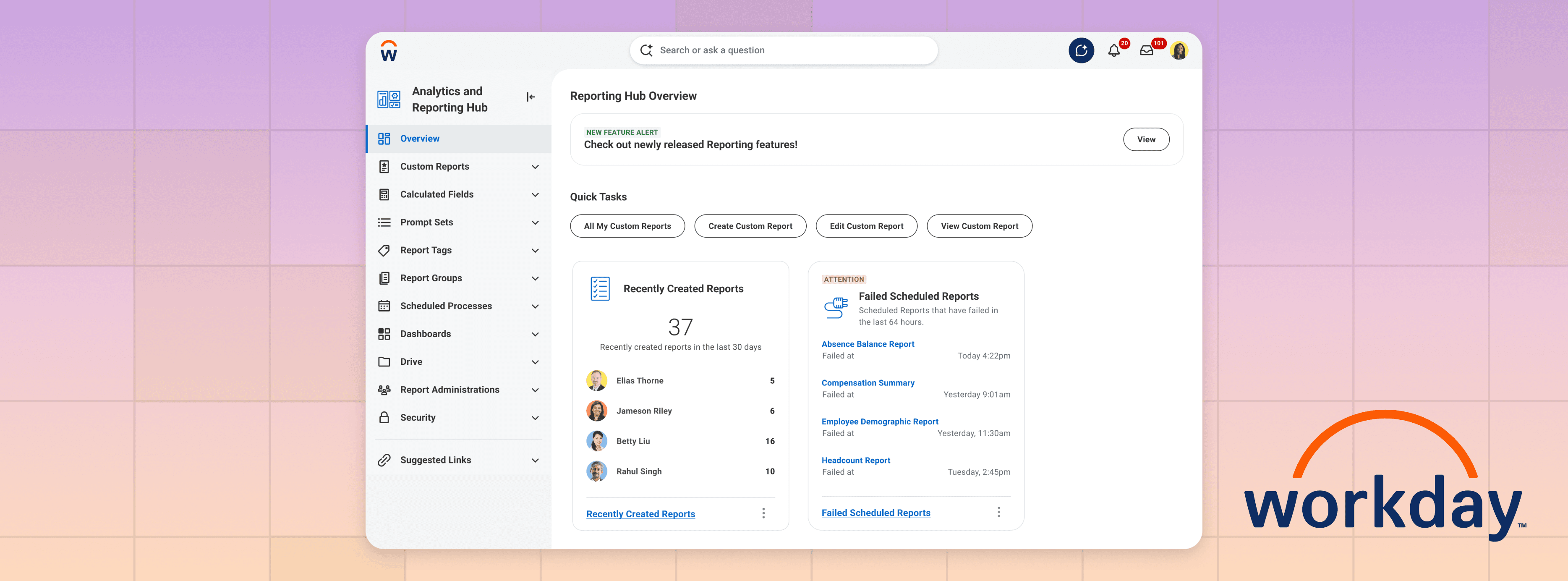
A one stop shop for all things Reporting.

The Analytics and Reporting Hub is a centralized workspace that consolidates reporting tools, live reports, and actionable insights into a single home for Authors and Admins. It is a high touchpoint product area with 75% of Workday’s user base interacting with them.

Role

User Research and Testing, Workshopping, Design and Prototyping

Tools

Figma, Miro, Jira

Team

Anna Chi, Developer, Product Manager

THE PROBLEM

A Core Workday Pillar Lacked a Centralized Home

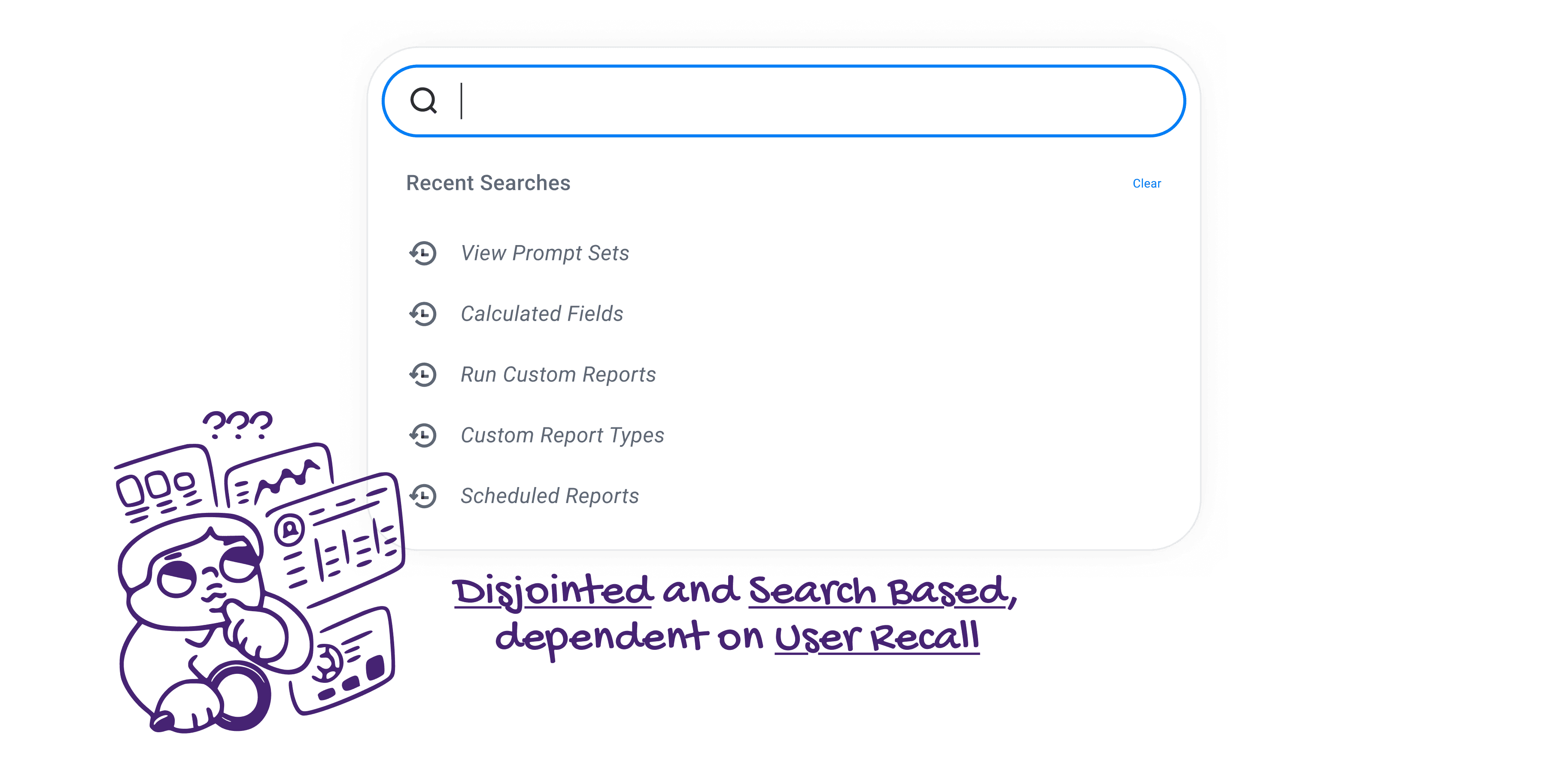
Reporting is the backbone of Workday, transforming complex data into the insights professionals need to make critical business decisions. Despite being a core pillar with 75% of Workday’s user base interacting with these tools, Reporting lacked a dedicated home. Tasks were scattered across the platform, making the experience disjointed and heavily reliant on manual search.

THE PROBLEM

A Core Workday Pillar Lacked a Centralized Home

Reporting is the backbone of Workday, transforming complex data into the insights professionals need to make critical business decisions. Despite being a core pillar with 75% of Workday’s user base interacting with these tools, Reporting lacked a dedicated home. Tasks were scattered across the platform, making the experience disjointed and heavily reliant on manual search.

"I use the main search to find things, but it's a struggle if you don't remember the name. While reports are a bit easier to track down, I really struggle to find the right tasks.

I basically have to write the most important tasks down in my own personal notes."

— Customer, Workday Process Expert

USERS

This feature involved 2 User Groups

USERS

This feature involved 2 User Groups

Administrator

👨🏼‍💻

Responsible for system health, security, and troubleshooting errors.

Author

👩🏻‍💻

Responsible for building, testing, and scheduling complex reports for HR and Finance.

WORKSHOP

Aligning Stakeholders through a Collaborative Workshop

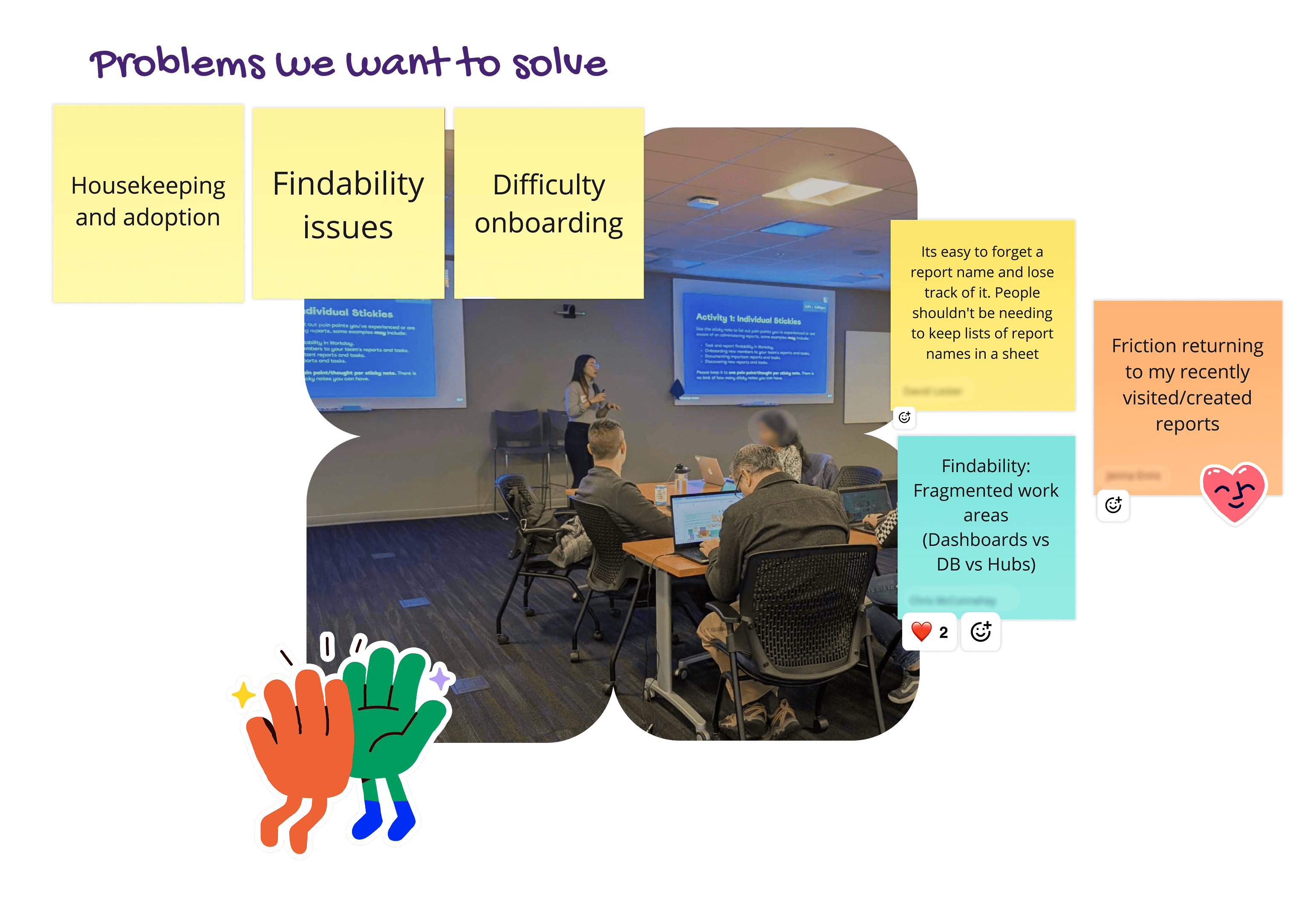
To move from abstract requirements to a concrete product vision, I facilitated a full-day workshop at Workday’s Pleasanton HQ. By bringing together 9 internal "power users" (Data Analysts and Product Experts), we conducted a deep dive into the functional needs of a centralized reporting home.

WORKSHOP

Aligning Stakeholders through a Collaborative Workshop

To move from abstract requirements to a concrete product vision, I facilitated a full-day workshop at Workday’s Pleasanton HQ. By bringing together 9 internal "power users" (Data Analysts and Product Experts), we conducted a deep dive into the functional needs of a centralized reporting home.

Facilitation

I led the team through two individual discovery activities and one collaborative group sketching session to align our mental models.

Synthesis

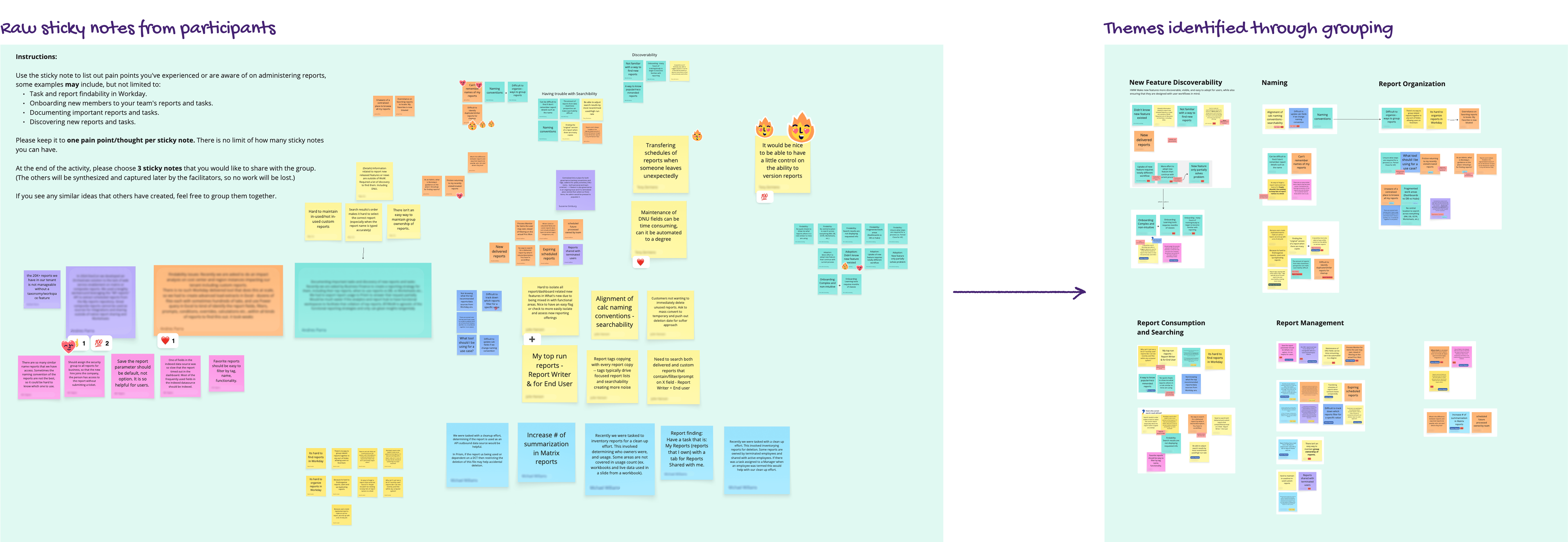
We identified 7 major themes of friction—ranging from Discoverability to Report Cleanliness—which served as our north star for the project’s scope.
WORKSHOP SYNTHESIS

Translating Raw Feedback into Core Product Themes

To make sense of the vast amount of qualitative data generated during the workshop, I preformed an affinity mapping exercise. By clustering the individual sticky notes, user sketches, and verbal feedback based on shared pain points, I was able to move from isolated complaints to systemic user needs.

WORKSHOP SYNTHESIS

Translating Raw Feedback into Core Product Themes

To make sense of the vast amount of qualitative data generated during the workshop, I preformed an affinity mapping exercise. By clustering the individual sticky notes, user sketches, and verbal feedback based on shared pain points, I was able to move from isolated complaints to systemic user needs.

WORKSHOP INSIGHTS

Core Pain Points Identified, that drove the Proposed Solution

WORKSHOP INSIGHTS

Core Pain Points Identified, that drove the Proposed Solution

To make sense of the vast amount of qualitative data generated during the workshop, I led an affinity mapping exercise. By clustering the individual sticky notes, user sketches, and verbal feedback based on shared pain points, I was able to move from isolated complaints to systemic user needs.

🚧 Discoverability

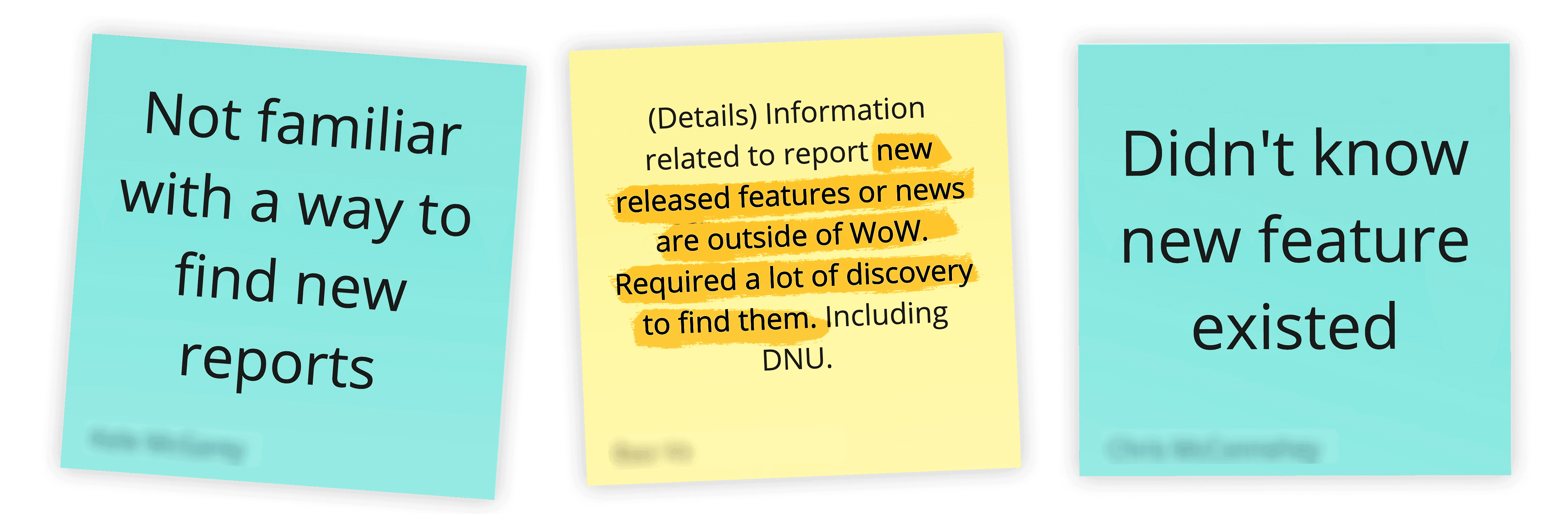
Discovering new features is not intuitive, news on feature releases live outside of Workday – and takes a lot of effort to find.

WORKSHOP SYNTHESIS

Core Pain Points Identified

Discovering new features is not intuitive, news on feature releases live outside of Workday – and takes a lot of effort to find.

🚧 Centralized Space

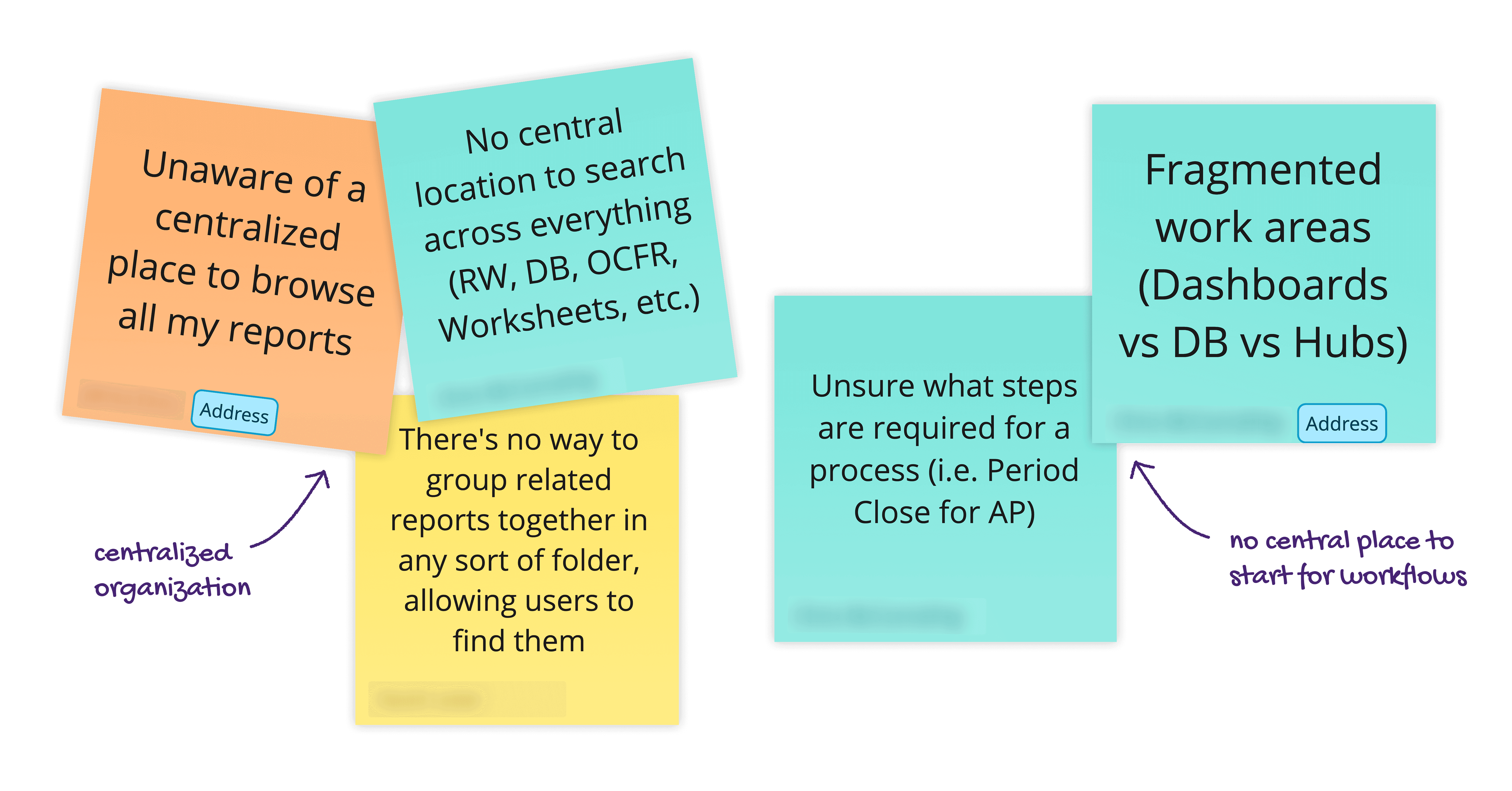
There is no centralized space for reports and processes to live and be categorized.

WORKSHOP SYNTHESIS

Core Pain Points Identified

There is no centralized space for reports and processes to live and be categorized.

🚧 Usage Data

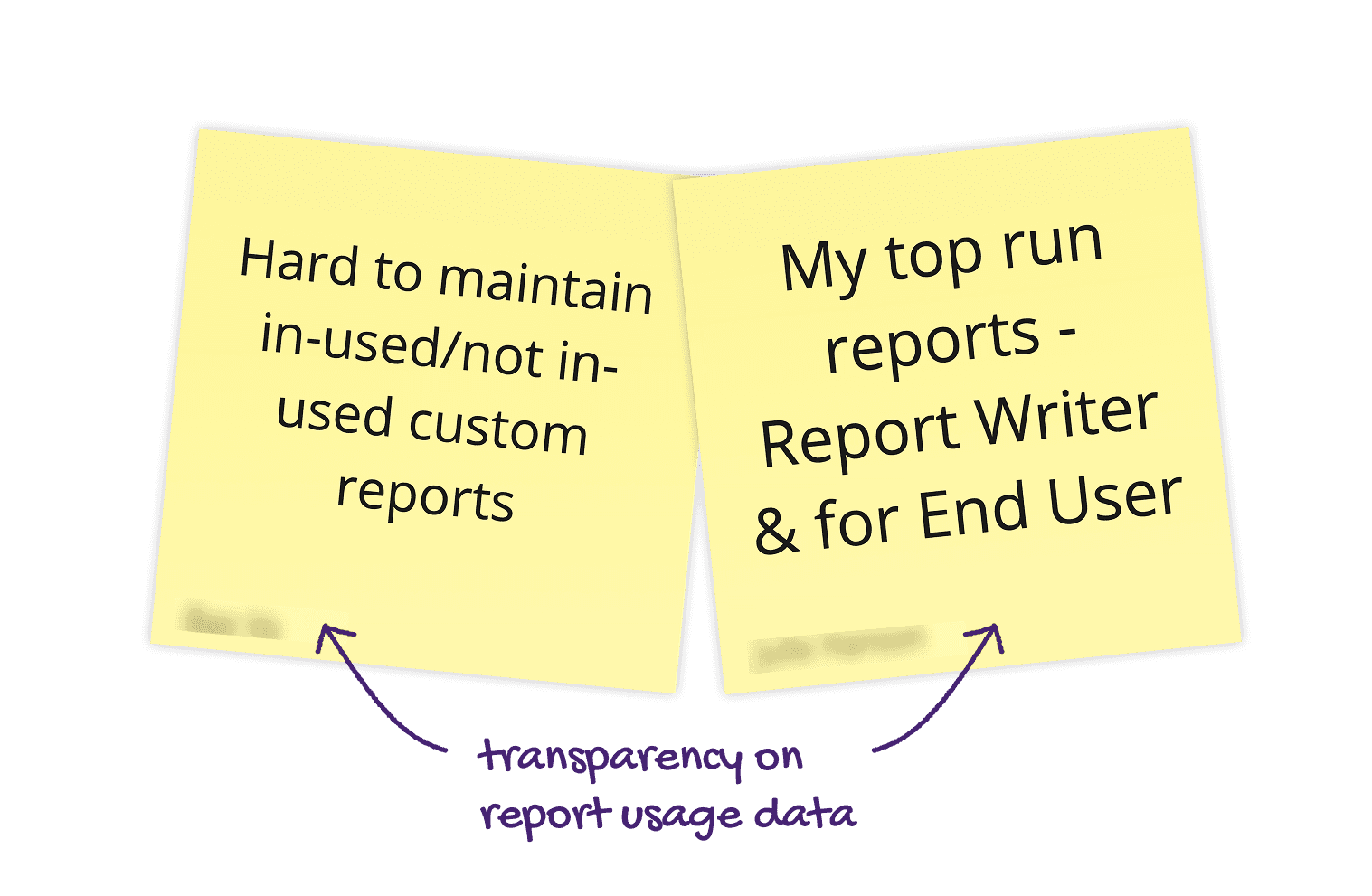
Admins specifically, required report usage data to assist with workspace management.

WORKSHOP SYNTHESIS

Core Pain Points Identified

Admins specifically, required report usage data to assist with workspace management.

PROPOSED SOLUTION

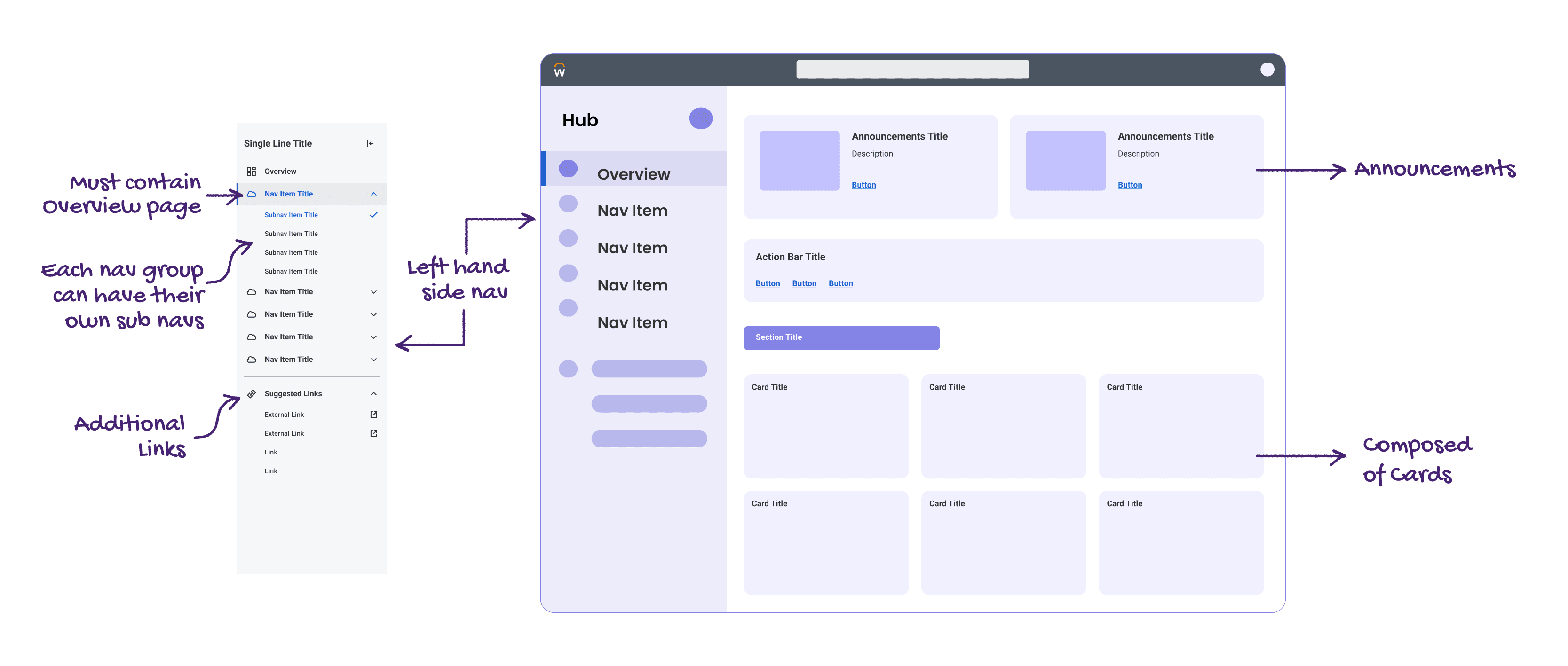
Moving from a disjointed, search-based experience to a unified workspace for Authors and Admins by utilizing the Workday Hub Framework.

PROPOSED SOLUTION

Moving from a disjointed, search-based experience to a unified workspace for Authors and Admins by utilizing the Workday Hub Framework.

The design adopts Workday’s mandatory architecture—defined by a persistent left-hand navigation and card-based overview. Rather than reinventing the UI, I focused on optimizing the Information Architecture within these constraints to ensure the new Hub felt consistent with the wider platform.

FEATURE GOAL

Moving from Search-Based Discovery to a Unified Hub

Our objective was to move away from a fragmented workflow and build a centralized workspace. The goal is to integrate three critical components:

FEATURE GOAL

Moving from Search-Based Discovery to a Unified Hub

Our objective was to move away from a fragmented workflow and build a centralized workspace. The goal is to integrate three critical components:

Integrate 3 Critical Components

Execution Tasks

Report Viewing

Actionable Analytics
Informationa Architecture Brainstorm

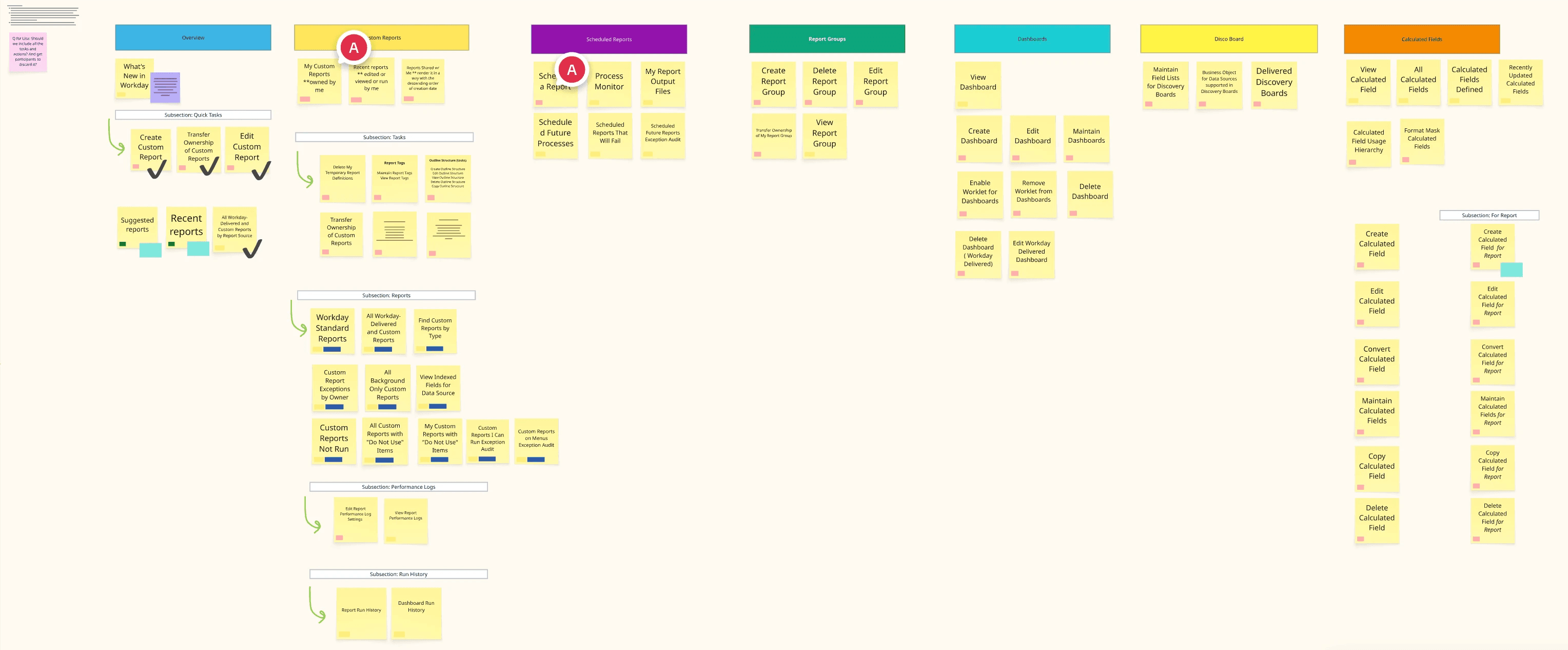
Mapping the Ecosystem: An exhaustive audit of all tasks and reports to define the Hub’s structure.

Reporting in Workday is massive. I started with a complete brain dump inside Miro, capturing every possible task, which I then clustered into logical categories to form our foundational IA.

Informationa Architecture Brainstorm

Mapping the Ecosystem: An exhaustive audit of all tasks and reports to define the Hub’s structure.

Reporting in Workday is massive. I started with a complete brain dump inside Miro, capturing every possible task, which I then clustered into logical categories to form our foundational IA.

Customer Research

Using an early-stage IA to uncover what users expected versus what we originally assumed.

Customer Research

Using an early-stage IA to uncover what users expected versus what we originally assumed.

Validating the Information Architecture

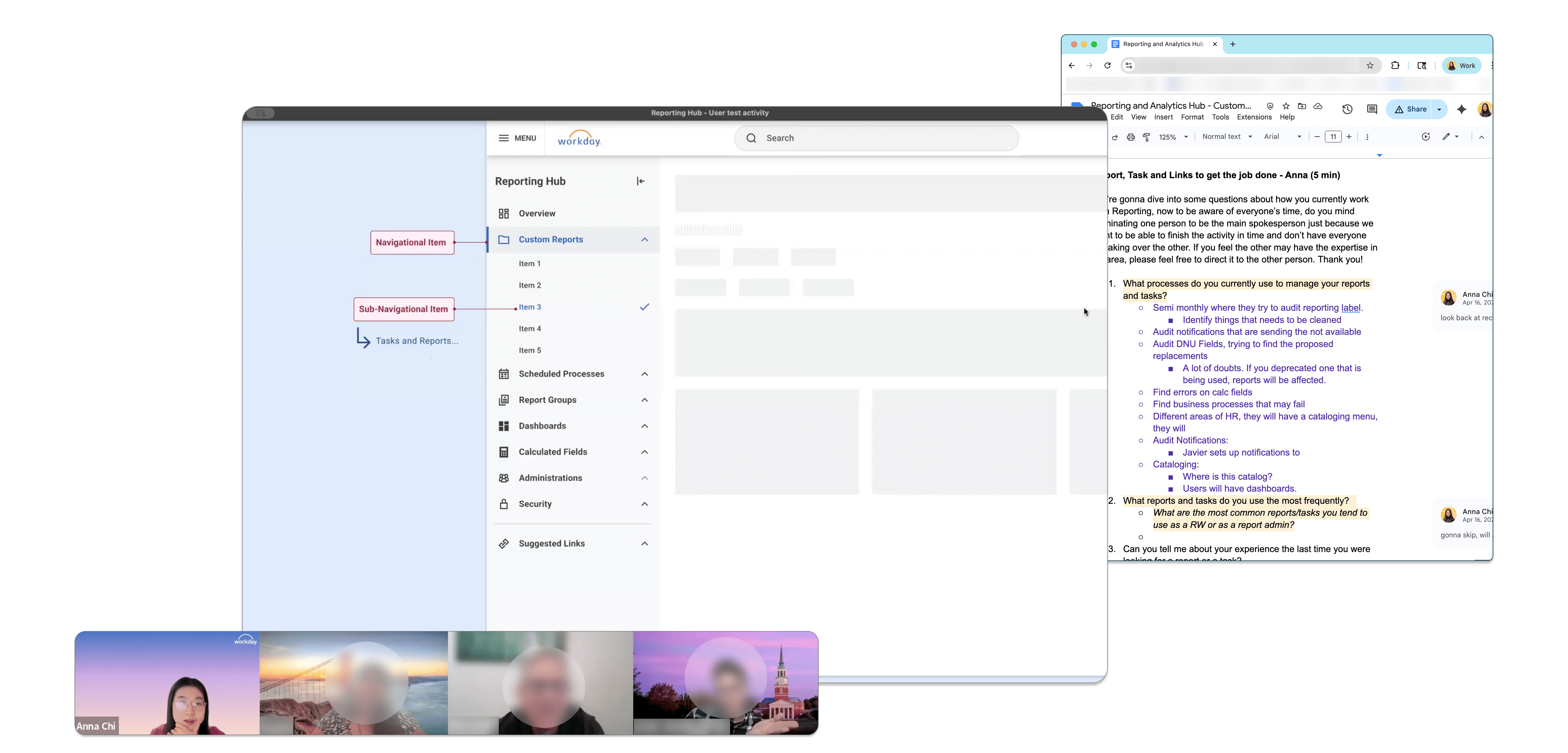
To test our initial navigation structure, I planned and moderated 10 research sessions with key customers. Participants ranged from Finance Managers to Workday Analysts (2–3 users per session).

The Activity

I presented a navigation label and asked users to verbally list what they expected to find within it before revealing our proposed list.

The Goal

This gap analysis confirmed where our hypothesis aligned with user expectations and highlighted missing content that needed to be added.

Insights

1. Experienced users didn't just need a navigation menu; they needed proactive, time saving data.

I discovered that for power users, surfacing "Recent Activity" was far more valuable than simply improving discoverability.

Insights

1. Experienced users didn't just need a navigation menu; they needed proactive, time saving data.

I discovered that for power users, surfacing "Recent Activity" was far more valuable than simply improving discoverability.

“I kind of know all the tasks that are available. So having them kind of in one space may not necessarily be as important to me… I would rather have things that told me about ‘Reports Created Recently’. That would be a time saving.”

— Financial Systems Specialist. 

Insights

2. Admins needed immediate visibility into system health and usage without the friction of running manual reports.

Insights

2. Admins needed immediate visibility into system health and usage without the friction of running manual reports.

Insights

2. Admins needed immediate visibility into system health and usage without the friction of running manual reports.

--

"The reason why I think it's important for me to be able to see who the top 10 most run reports is because we have certain groups that use a lot of Workday Reports, and then others that don't and we would like to understand both of these groups.

This will give me the opportunity to see in a really quick snapshot, without really having to go into running the report run history to take a look to see who's run it.

— Reporting and Analytics Lead

Final Design

A Unified, Insight-Driven Workspace for Reporting Power Users

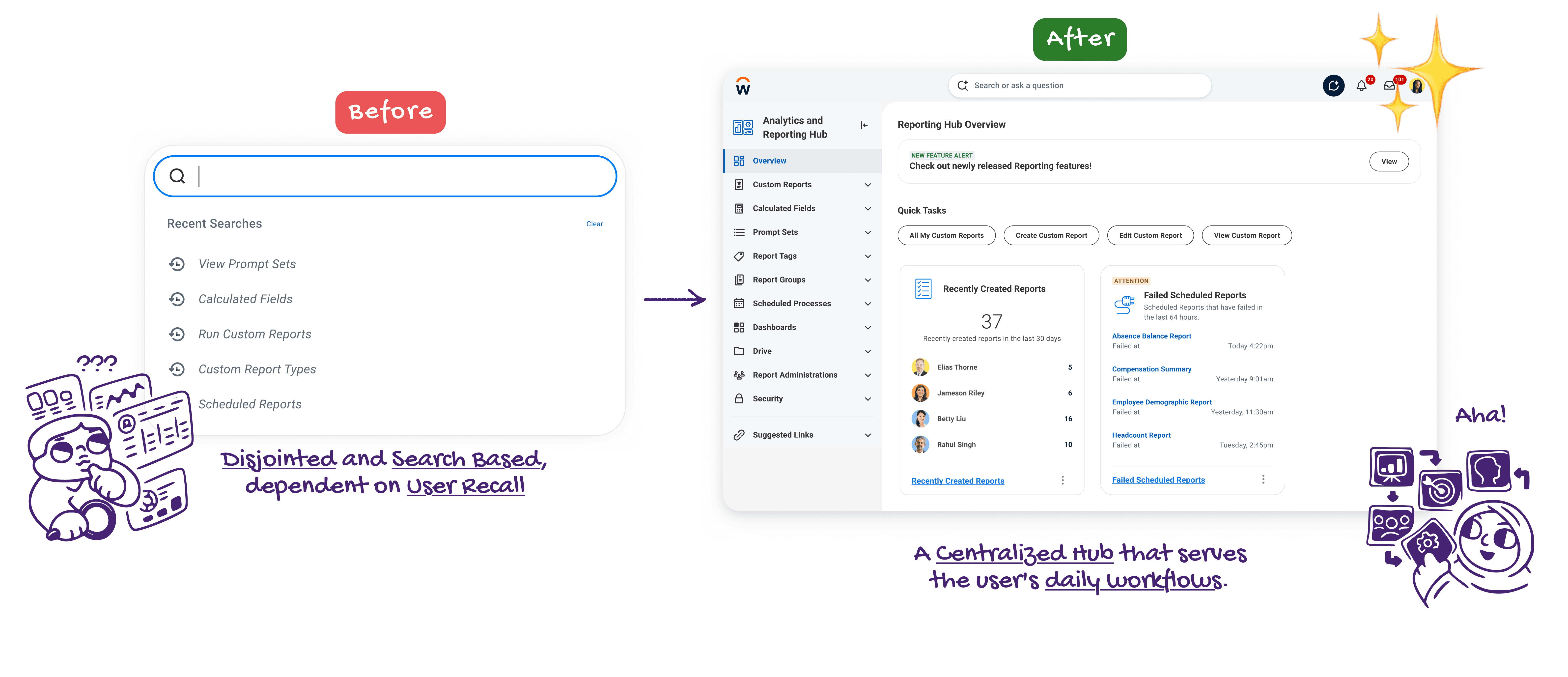
The goal of the Analytics and Reporting Hub was shifting the user behavior from reactive searching to proactive discovery. Previously, users were stalled by a fragmented interface that tested their recall ability. The new unified dashboard eliminates that friction entirely. By surfacing high-priority tasks and actionable insights right on the home hub screen, we transformed a frustrating memory test into an intuitive, empowering workspace.

Final Design

A Unified, Insight-Driven Workspace for Reporting Power Users

The goal of the Analytics and Reporting Hub was shifting the user behavior from reactive searching to proactive discovery. Previously, users were stalled by a fragmented interface that tested their recall ability. The new unified dashboard eliminates that friction entirely. By surfacing high-priority tasks and actionable insights right on the home hub screen, we transformed a frustrating memory test into an intuitive, empowering workspace.

Feature Breakdown

Hub Navigation

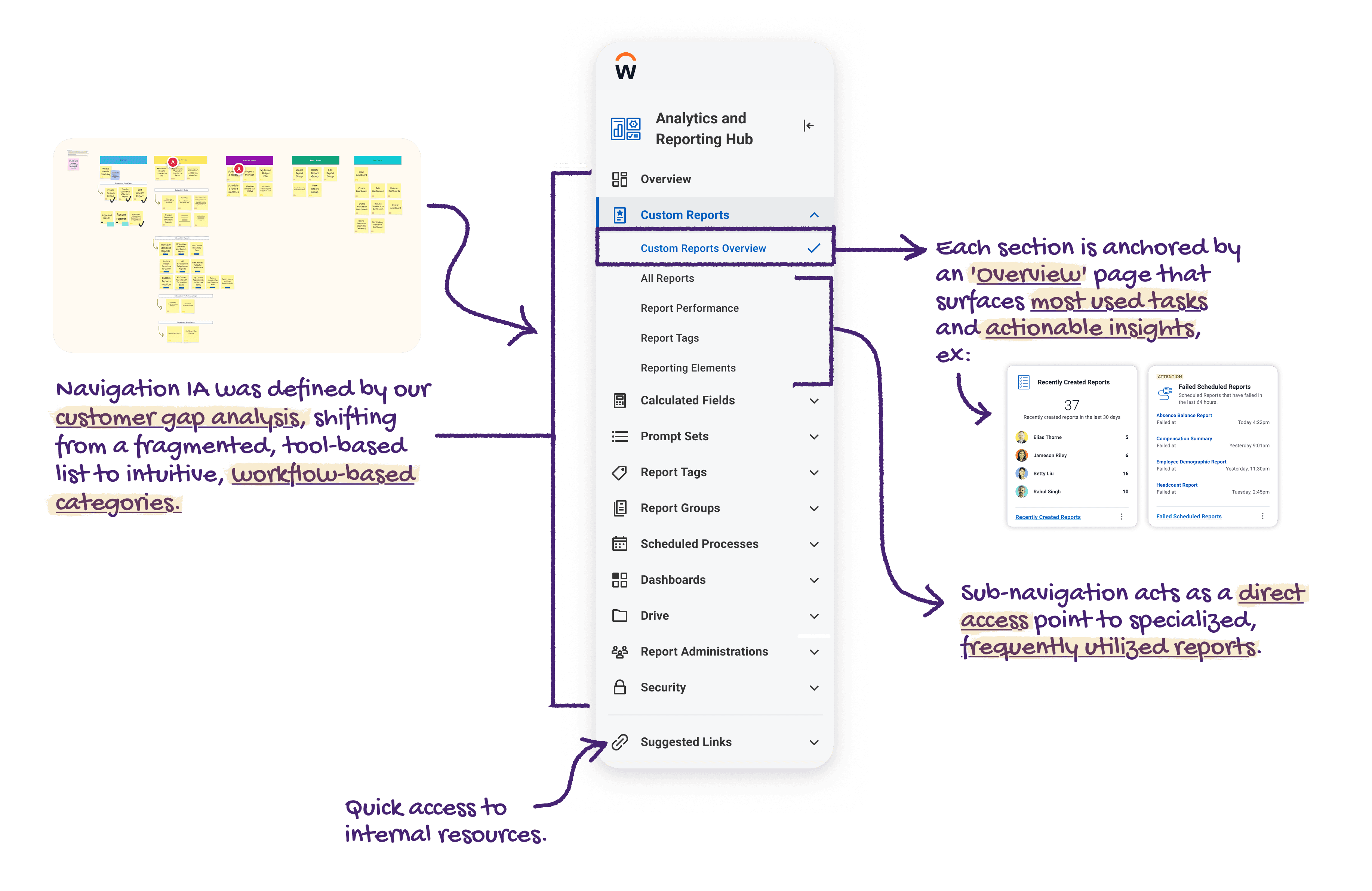
Workday’s reporting ecosystem is massive, making Information Architecture a critical challenge. Relying on our customer gap analysis, I transformed a fragmented menu into intuitive, workflow-based categories. To prevent cognitive overload, each section is anchored by an 'Overview' page that acts as a strategic landing pad, instantly surfacing actionable insights and frequently used reports.

Feature Breakdown

Hub Navigation

Workday’s reporting ecosystem is massive, making Information Architecture a critical challenge. Relying on our customer gap analysis, I transformed a fragmented menu into intuitive, workflow-based categories. To prevent cognitive overload, each section is anchored by an 'Overview' page that acts as a strategic landing pad, instantly surfacing actionable insights and frequently used reports.

"I use the main search to find things, but it's a struggle if you don't remember the name. While reports are a bit easier to track down, I really struggle to find the right tasks.
I basically have to write the most important tasks down in my own personal notes."

— Customer, Workday Process Expert
Feature Breakdown

The Overview Page of the Hub

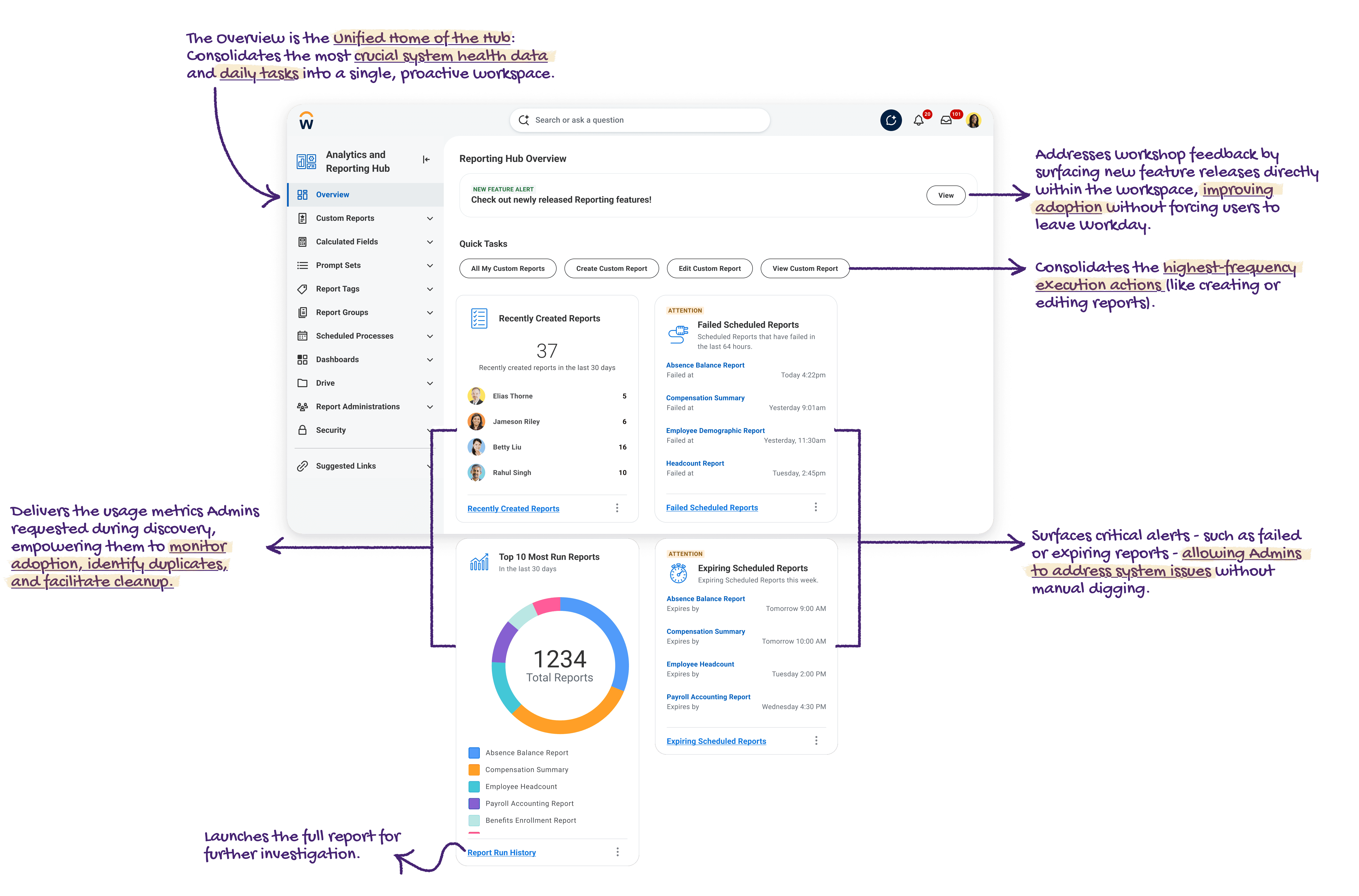
The Hub Overview serves as the strategic landing page for the Workday Reporting ecosystem. By anticipating user needs - surfacing new feature alerts, top tasks, and actionable system health metrics the moment a user logs in - we eliminated the friction of manual discovery and delivered a truly proactive, insight-driven workspace.

Feature Breakdown

The Overview Page of the Hub

The Hub Overview serves as the strategic landing page for the Workday Reporting ecosystem. By anticipating user needs - surfacing new feature alerts, top tasks, and actionable system health metrics the moment a user logs in - we eliminated the friction of manual discovery and delivered a truly proactive, insight-driven workspace.

"Report housekeeping is an interesting challenge. Sometimes you build things and people don't use them again. They're just sitting in a drawer... It would be nice to see stats in terms of what users are actually using."

— Customer, HR Analytics Lead
Feature Breakdown

Domain-Specific Overviews

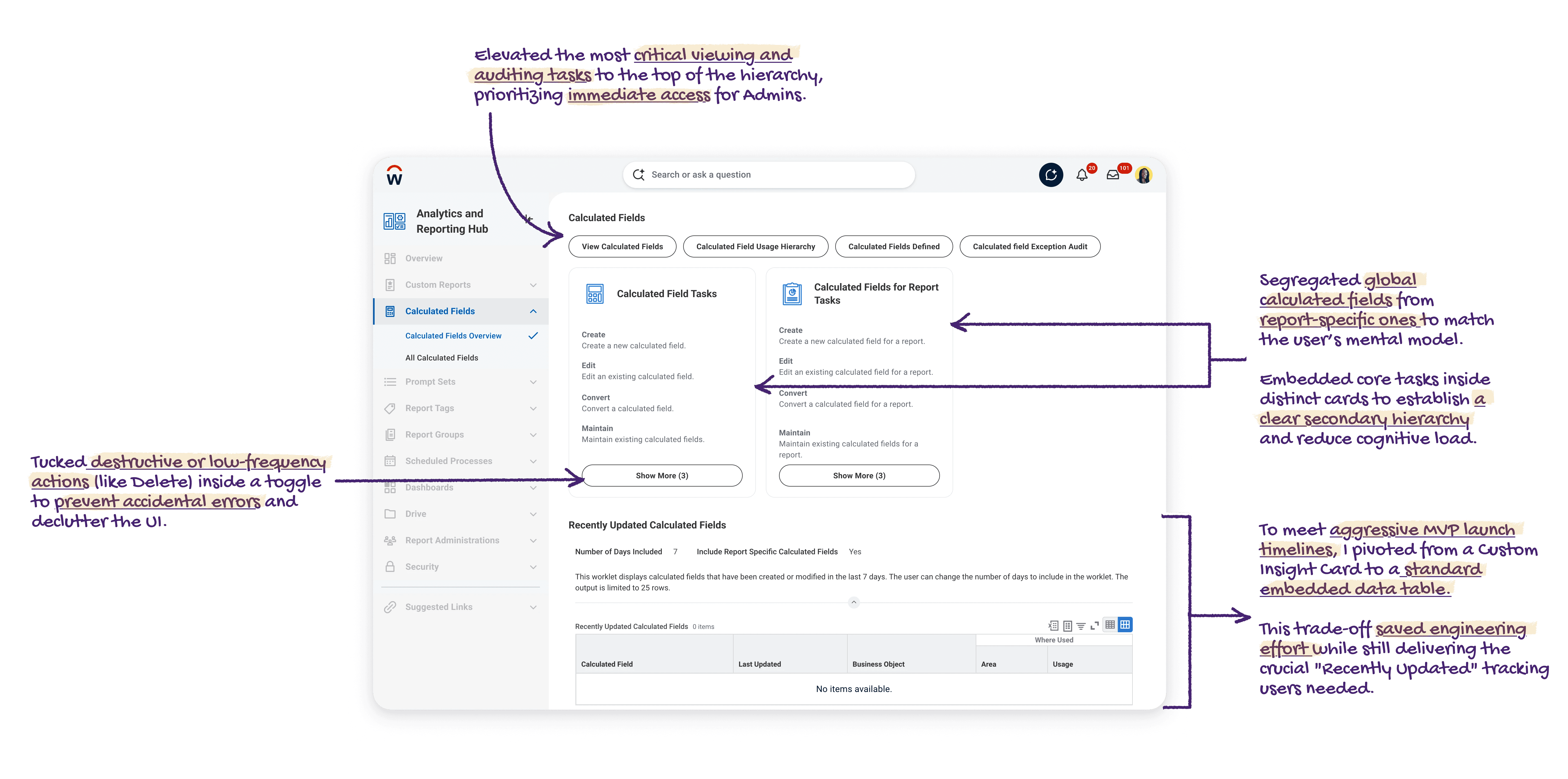
To organize Workday's dense reporting ecosystem, I designed standardized landing pages tailored to specific workflows. Using the 'Calculated Fields' domain as an example, this layout replaces the fragmented search model. Consolidating execution tasks, usage hierarchies, and recent activity into a single workspace removes the friction of user recall.

Feature Breakdown

Domain-Specific Overviews

To organize Workday's dense reporting ecosystem, I designed standardized landing pages tailored to specific workflows. Using the 'Calculated Fields' domain as an example, this layout replaces the fragmented search model. Consolidating execution tasks, usage hierarchies, and recent activity into a single workspace removes the friction of user recall.

During customer interviews, users emphasized the need for a bird's-eye view of recently created fields. While the Hub’s framework supports visually driven insight cards, strict MVP timelines required a pragmatic pivot. I opted to embed a standard data report instead, saving crucial engineering time while still delivering the exact visibility our users required.

Feature Breakdown

Worflow Specifc Pages

During customer interviews, users emphasized the need for a bird's-eye view of recently created fields. While the Hub’s framework supports visually driven insight cards, strict MVP timelines required a pragmatic pivot. I opted to embed a standard data report instead, saving crucial engineering time while still delivering the exact visibility our users required.

"Having all the calculated field tasks in one place helps a lot. At the moment, every single one of those requires a separate search. Some we use every day, but others we use rarely and simply forget they exist."

— Customer, HR Data Manager
Impact and Results

A Successful 25R2 Launch and Immediate Enterprise Adoption

The Analytics and Reporting Hub was successfully deployed to all Workday customers in the 25R2 release.

Impact and Results

A Successful 25R2 Launch and Immediate Enterprise Adoption

The Analytics and Reporting Hub was successfully deployed to all Workday customers in the 25R2 release.

Massive Preview Adoption:

2,630 Unique Customers adoption

Before the official launch, the Hub saw incredible momentum with 2,630 unique customers adopting the feature in Preview.

Rapid Growth:

>100% month-over-month usage increase

We tracked a >100% month-over-month increase in monthly visitors from August to September during the preview phase alone.

Immediate Go-Live Success:

Feature enabled by 183 unique tenants

Within just 48 hours of the production launch, 183 unique enterprise tenants had already enabled the feature.

Finally updated my portfolio after 45 identity crisis, and giving myself dry eye 2026 ©

🍣

🍵

🐱

☕️

Finally updated my portfolio after 45 identity crisis, and giving myself dry eye 2026 ©

🍣

🍵

🐱

☕️

Finally updated my portfolio after 45 identity crisis, and giving myself dry eye 2026 ©

🍣

🍵

🐱

☕️

Create a free website with Framer, the website builder loved by startups, designers and agencies.